

Create an API Token
To create an API token:1
From the Main Navigation select ‘Integrations’ on the left-side panel, and then choose ‘Manage Integrations’.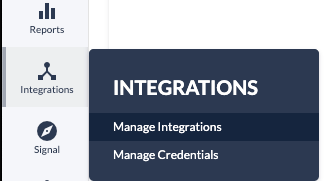
2
Once you’re on the ‘Integrations’ page, locate and click on the ‘Invoca APIs’ app.
3
Go to the upper-right corner and click on the ‘+ New API Credential’ option.
4
Enter the Description and click Save.
It is strongly recommended to include a descriptive label that identifies the API type and its intended use.
Using API Tokens to Access Invoca APIs
Send the access token as anAuthorization header on your request, of format "Authorization: <token>".
Example using Curl to make an API call with token-based authentication:
API Guidelines
- Users should generate their own API tokens. Tokens should be treated like passwords and not be emailed or transmitted over other insecure mediums, nor should they be stored in a customer’s source code repository.
- As a network user, you should not generate a token on behalf of Advertisers or Publishers as tokens inherit the privileges of the user generating it.
- Invoca does not use OAuth refresh tokens.